Run multiple AI coding agents side by side
Built on OpenCode.
Do more parallel work. Use any agent.
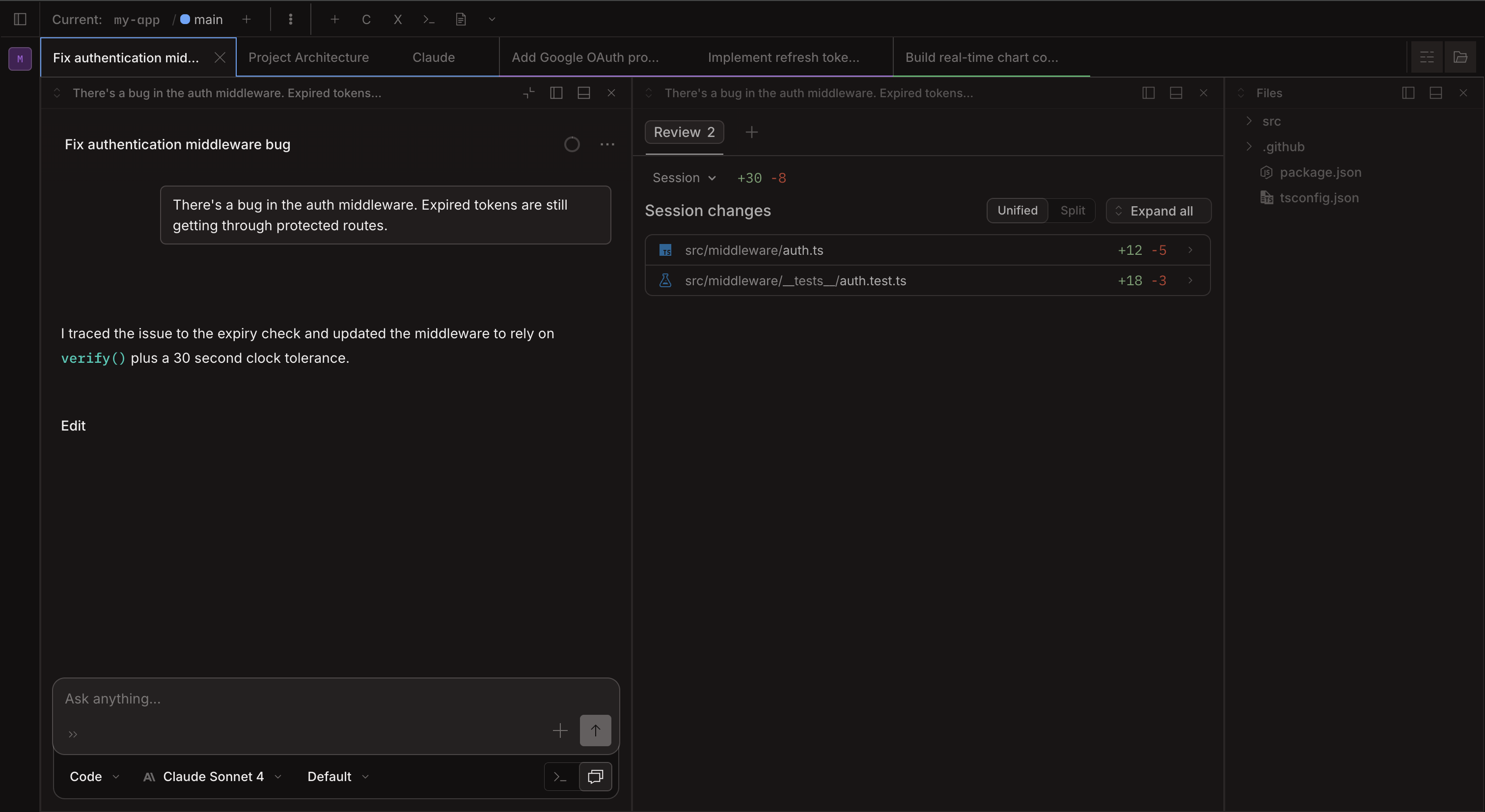
Claxedo gives you a multi-pane desktop workspace for Claude Code, Codex, Gemini CLI, and more, with review, process control, and workspace-aware context.
Review changes before they hit your codebase
Keep terminals, processes, and workspace context organized
// Browser preview
Explore the Claxedo workflow in browser
This browser preview is backed by demo data and mocked services. Use it to understand the workspace model, navigation, and review flow before moving into the full desktop app.
- Side-by-side panes for parallel implementation work
- Managed terminals for Claude Code, Codex, Gemini CLI, and more
- A dedicated review surface for changed files and diffs
// Relationship
OpenCode gives you the foundation. Claxedo gives you the workspace layer.
OpenCode
Open source AI coding foundation for sessions, model routing, tool use, and the core coding loop.
Claxedo
Desktop workspace layer for parallel agent workflows, review, process control, and multi-pane work.
// Use cases
What the workflow looks like in practice
Parallel runs
Run multiple implementation tasks at once
Split panes across active branches, keep each agent in its own terminal, and watch work progress without tab chaos.
Review surface
Inspect diffs before anything lands
Open a dedicated review workspace for changed files, session diffs, and comments before you decide what ships.
Agent support
Use the coding agents you already prefer
Claude Code, Codex, Gemini CLI, Amp, Cursor agent, and other CLI tools all fit into the same workspace model.
Process management
Keep shared processes under control
Run long-lived services inside the workspace, watch status at a glance, and keep ports and process state organized across projects.
Doc authoring
Write first-class docs beside the implementation
Draft specs, notes, prompts, and working docs in the same workspace instead of scattering authoring across separate tools.
// Available now
What you get in Claxedo today
Panes, tabs, and groups
Keep multiple workspaces open without nested clicks, then split active work into side-by-side panes when you need parallel focus.
Any CLI coding agent
Run Claude Code, Codex, Gemini CLI, Pi, Amp, Cursor agent, or any other coding CLI in its own managed terminal.
Agent lifecycle awareness
See which agents are running, waiting, or finished, then stop or restart them from the workspace when needed.
Process management
Configure shared processes, auto-run them across workspaces, avoid port collisions, and keep state per process.
Workspace-aware MCP
Use Model Context Protocol with awareness of the active workspace instead of only the current file.
First-class AI review
Inspect changed files, unified diffs, and agent output from a review surface built for multi-agent work.
Pages in the workspace
Write specs, notes, prompts, and working docs inside the same workspace as the implementation work.
Mobile access
Open the web workspace from a tablet or phone when you need to check progress away from your desk.
// OpenCode foundation
Claxedo keeps the OpenCode strengths underneath the workspace layer.
Built on OpenCode
Claxedo inherits the open source foundation, active upstream development, and transparent implementation model.
Any model, any provider
Use Anthropic, OpenAI, OpenRouter, or any compatible endpoint with your own API keys.
Themes and shortcuts
Customize the environment with themes and keyboard shortcuts instead of adapting to fixed defaults.
// Coming soon
Doc lifecycle tooling
Spec pages already ship today. Broader document flow from dump to explore to design to implement is still on the roadmap.
// Pricing
One price, everything included
$99 Free during beta
Free for beta users
- + Unlimited projects
- + Unlimited parallel agents
- + Multi-pane workspace
- + All agent integrations
- + Process management
- + Workspace-aware MCP
- + Page editor
- + GitHub source code access
- + Discord community access
- + Lifetime support
macOS, Linux, and Windows supported. Free during beta.
// Quick answers
Still not convinced?
Have a question? Reach out and we’ll help.
// FAQ
Frequently asked questions
What is Claxedo?
Claxedo is a desktop workspace built on top of OpenCode. It adds multi-pane layouts, project tabs, process management, and a review surface so you can run multiple AI coding workflows in parallel.
How does it relate to OpenCode?
OpenCode is the open source foundation that handles AI sessions, model routing, and tool use. Claxedo syncs daily with upstream OpenCode and adds the workspace layer on top.
Which coding agents does it support?
Any CLI-based coding agent, including Claude Code, Codex, Gemini CLI, Amp, Cursor agent, and others. Each agent runs in its own managed terminal inside the workspace.
Do I need my own API keys?
Yes. Claxedo is a local workspace, not a hosted service. You bring your own API keys for whichever model provider you use.
Is there a free trial?
There is an interactive browser preview on this site that uses demo data and mocked services. The full desktop app requires a license.
What platforms are supported?
macOS, Linux, and Windows. Claxedo uses a Tauri desktop shell, so the app targets all three major desktop platforms.